Understanding Qualification Sessions
Comprehensive explanation of qualification sessions in Archeris: how session waves work, configuring ends and arrows, assigning categories, and the scoring lifecycle.
In archery tournaments, the Qualification Round (also known as the Ranking Round) determines the baseline score and ranking for all participants before they proceed to elimination match play. In Archeris, a Qualification Session is the primary operational container that organizes which categories shoot, when they shoot, and how many arrows each archer releases.
1. What is a Qualification Session?
A qualification session represents a distinct shooting time-block (wave) at your tournament venue. Inside each session, organizers configure:
- Session Name & Schedule: e.g., Session 1 - Recurve & Barebow Morning Wave (08:00 - 11:30).
- Assigned Categories: Specific bow divisions, age groups, and gender classes competing simultaneously during that window.
- Target Line Allocations: The physical target butts and positions (A, B, C, D) designated for this session.
- Scoring Format: Number of ends (rambahan) and arrows per end.
2. Why Tournaments Use Multiple Sessions (Waves)
Most tournament venues have a limited number of physical target butts (e.g., 30 butts accommodating up to 120 archers at 4 archers per butt). If your championship hosts 300 archers across various categories, you cannot accommodate everyone on the shooting line at the same time.
By creating multiple sessions (e.g., Wave 1: Morning and Wave 2: Afternoon, or Day 1 vs Day 2), you can divide your total participant roster across available target lanes while maintaining separate, synchronized scoring runs for each group.
3. Configuring Scoring Parameters (Ends & Arrows)
When creating a qualification session in the Organizer Dashboard > Qualification > Sessions tab, you configure the official scoring rules:
- Number of Ends (Total Rambahan): Typically 6 ends for a half round, 10 ends, or 12 ends (e.g., 2 sessions of 6 ends = 36 arrows each, totaling 72 arrows for a standard World Archery 720 round).
- Arrows per End: Usually 6 arrows for outdoor target archery (4 minutes per end) or 3 arrows for indoor archery (2 minutes per end).
- Max Score per Arrow: 10 points (with X-ring count tracked automatically for tie-breaking).
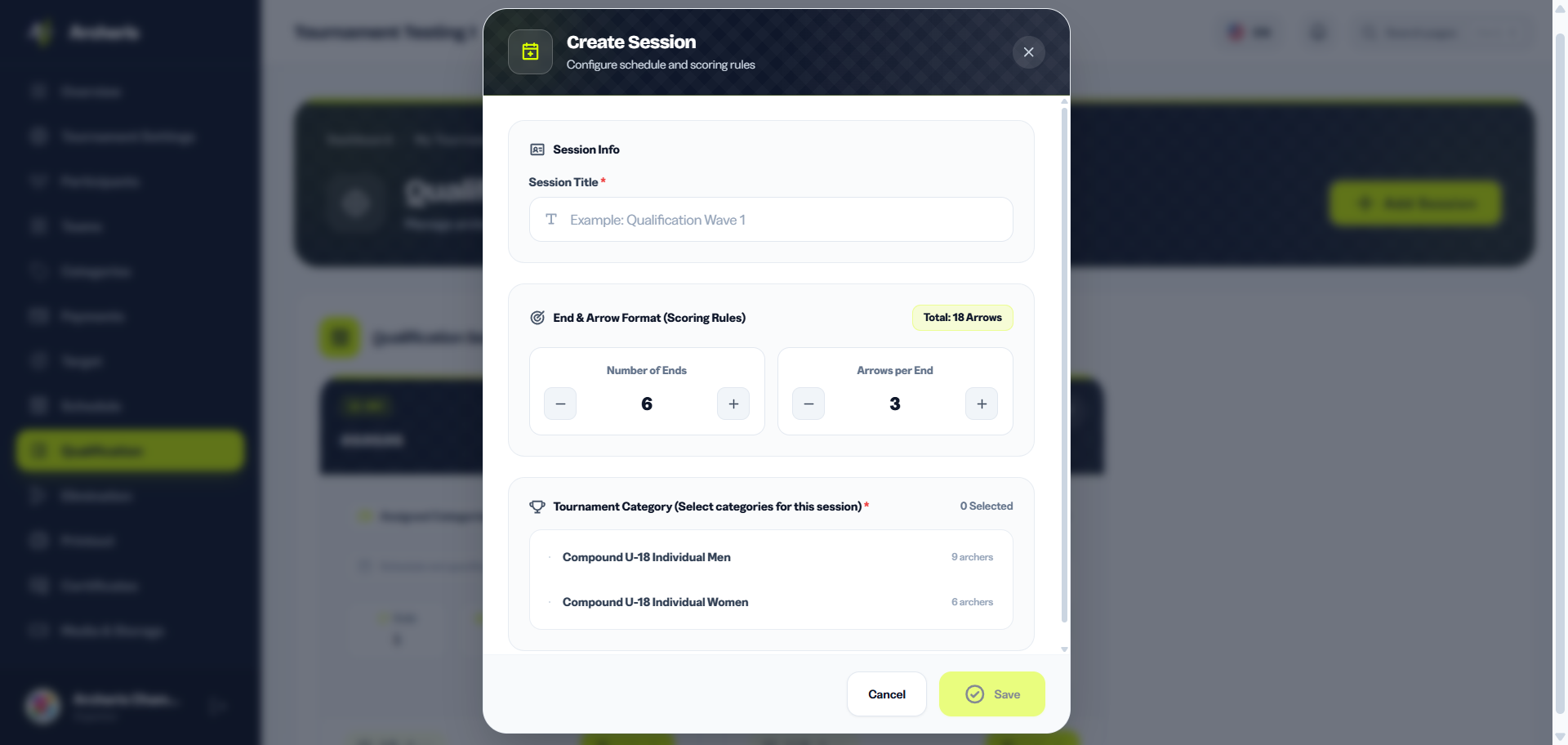
These parameters cannot be changed after scorekeepers have started entering scores for a session, so make sure they reflect the official competition rules before unlocking the session on competition day.
4. Assigning Competition Categories to Sessions
After creating a session, you select which event categories participate in that specific wave. Multiple categories that share the same distance and target face size can be grouped into the same session (for example, Recurve Men U-18 (60m) and Recurve Women U-18 (60m)).
Once categories are assigned, all registered participants in those categories automatically become eligible for target butt assignment within that session.
5. Session Status Lifecycle & Progression
Each qualification session in Archeris moves through clear operational stages:
- Draft / Setup: Session is created, scoring parameters and target assignments are prepared.
- Locked (Belum Dibuka): Session is ready but scoring input by mobile scorekeepers is locked until official practice finishes.
- Unlocked / In Progress (Sedang Berlangsung): Organizer unlocks the session, allowing scorekeepers to input arrow-by-arrow values on the mobile scoring app or physical score sheets.
- Completed & Finalized (Selesai & Dikunci): Scoring is concluded, all tie-breaks are resolved, and final ranking standings are approved by the head judge.
The diagram below shows the full status lifecycle of a qualification session — from when it is first created through to when final results are locked and published.

Notice that the In Progress → Locked transition is intentional — organizers can temporarily re-lock a session if a score protest is raised on the field, preventing further score changes until the dispute is resolved by a judge.
You can have multiple sessions at different lifecycle stages simultaneously — for example, Morning Wave (Completed) while Afternoon Wave is In Progress. Each session's lock state is managed independently.
6. How Qualification Results Feed into Elimination
When a qualification session is marked as completed, Archeris automatically aggregates total scores, 10s count, and X-count to generate the official qualification ranking leaderboard. This rank directly seeds participants into the Elimination Brackets (Bagan Eliminasi) (e.g., Rank 1 vs Rank 32, Rank 2 vs Rank 31), ensuring a seamless automated progression into the knockout phase.
The diagram below shows exactly how qualification results flow into the elimination bracket — from the moment all ends are submitted to the first match being ready to play.

The bracket is generated automatically the moment you click Generate on the Elimination page — no manual seeding required. The system always ensures the top two qualifiers can only meet in the gold medal final.